
Download FreeKapture – Free Screen Capture & Image Editing Tool for Windows
FreeKapture is a lightweight, no-cost screen capture and image editing tool designed for Windows users who need a simple yet effective solution for capturing and enhancing screenshots. Since its debut in 2007, FreeKapture has been a go-to option for individuals seeking a straightforward way to capture screen content and make quick edits—without the bloat of complex software. With a file size significantly smaller than most design and photography tools, it’s ideal for older systems or users with limited storage.
Available in English and compatible with Windows 98 and earlier versions, FreeKapture remains a reliable choice for basic screen capture needs. Though it hasn’t seen a major update since 2007, its core functionality continues to serve users who value simplicity and speed. Whether you're documenting software issues, creating tutorials, or saving important on-screen content, FreeKapture delivers a secure, free, and hassle-free experience.
Key Features of FreeKapture
FreeKapture offers a clean, minimal interface that focuses on essential screen capture and image editing tasks. Despite its age, the software packs several useful features that still hold up today. One of its standout capabilities is the ability to capture full-screen, window-specific, or custom region screenshots with a single click. This makes it perfect for users who need to quickly grab visuals for documentation, presentations, or sharing online. The built-in image editor allows basic modifications such as cropping, resizing, and adding text or simple shapes—ideal for annotating screenshots without needing advanced tools.
Another notable feature is its portability. FreeKapture doesn’t require installation, meaning you can run it directly from a USB drive or external storage. This is a major plus for users who work across multiple computers or prefer not to clutter their system with permanent software. The tool also supports multiple output formats, including BMP, JPG, and PNG, ensuring compatibility with most platforms and applications. Additionally, the software is completely free and ad-free, offering a secure environment for users concerned about malware or privacy risks.
For those working on older hardware, FreeKapture’s minimal resource usage is a game-changer. It runs smoothly on Windows 98 and even lower-end systems, making it a great option for legacy machines. While it lacks modern features like cloud integration, video recording, or advanced filters, its simplicity is its strength. If you're looking for a lightweight, free, and secure tool to capture and edit screens without the overhead of modern software, FreeKapture remains a surprisingly solid choice.
How to Install and Use FreeKapture
Installing FreeKapture is a breeze—especially since it’s designed as a portable application. There’s no need to go through a traditional installer. Simply download the .zip or .exe file from a trusted source, extract it to your desired folder (like your desktop or documents), and double-click the executable file to launch the program. This method ensures that no system changes are made, preserving your computer’s integrity and making it easy to remove later.
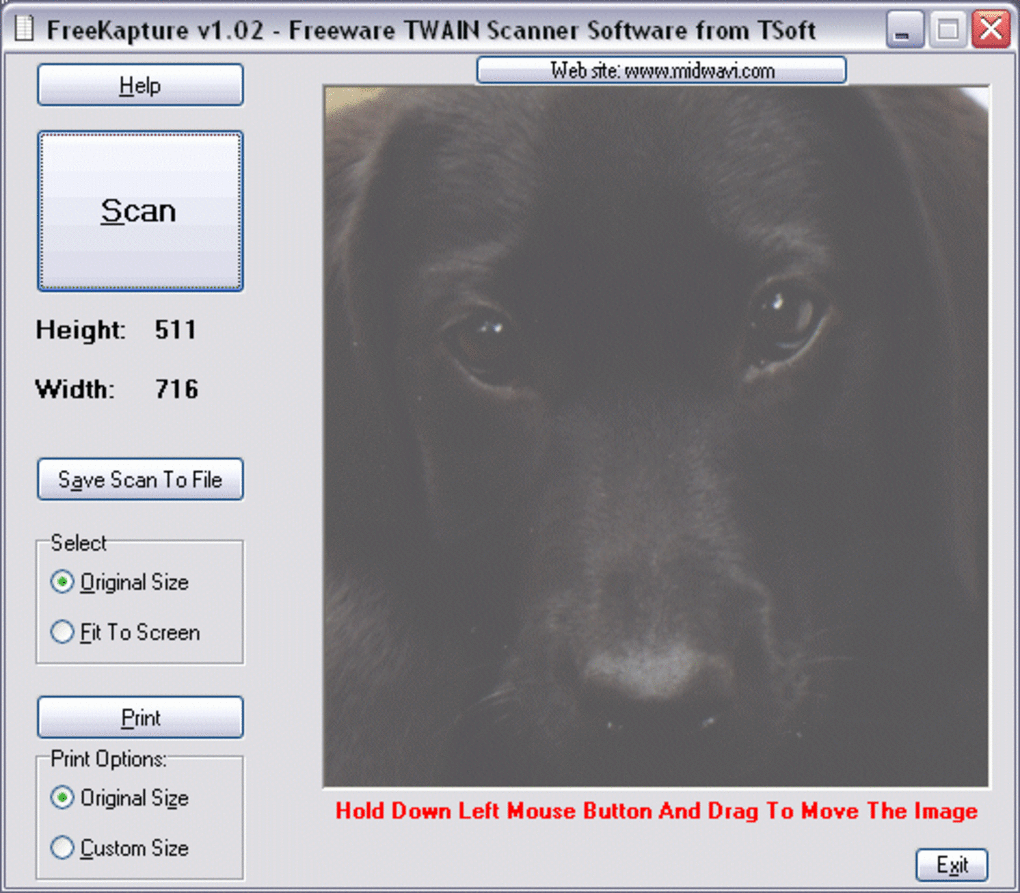
Once opened, FreeKapture presents a minimalist interface with clearly labeled buttons for different capture modes. To take a screenshot, click on the “Capture” button and choose between full screen, active window, or custom region. The screen dims slightly during selection, allowing you to precisely define the area. After capturing, the image appears in the editor window, where you can apply basic edits. You can crop unwanted areas, resize the image, add arrows or text annotations, and adjust brightness if needed.
When you’re satisfied with the result, click “Save” and choose your preferred format (JPG, PNG, or BMP). You can also copy the image directly to the clipboard for immediate use in emails, documents, or social media. For frequent users, the tool remembers your last settings, so you don’t have to reconfigure each time. While it lacks advanced automation or batch processing, its straightforward workflow ensures that even beginners can use it effectively. Overall, FreeKapture’s ease of use, combined with its low system requirements, makes it a reliable choice for quick, on-the-go screen capture tasks.
Compatibility and System Requirements
FreeKapture is specifically designed for older Windows operating systems, making it compatible with Windows 98, Windows ME, Windows 2000, and Windows XP. This broad compatibility is one of its biggest advantages, especially for users still relying on legacy systems or those who need software that works on minimal hardware. Unlike modern screen capture tools that demand high RAM and processing power, FreeKapture operates efficiently with minimal system resources, ensuring smooth performance even on outdated machines.
Since it’s a portable application, FreeKapture doesn’t require installation, which means it can be used on any Windows PC without leaving behind registry entries or temporary files. This makes it ideal for use in public or shared environments, such as libraries, schools, or office computers, where installing software might not be allowed. The software is available in English and does not require an internet connection to function, enhancing its privacy and security.
While FreeKapture lacks support for newer platforms like Windows 11, Mac, Android, or iOS, its niche remains strong among users with older systems. For those seeking a lightweight, free, and secure screen capture tool that works reliably on legacy hardware, FreeKapture is a dependable option. It’s also worth noting that because it hasn’t been updated in over 15 years, users should ensure they download it from trusted sources to avoid potential security risks. However, for its intended audience, FreeKapture continues to deliver consistent performance without the need for modern bells and whistles.
Pros and Cons of FreeKapture
- Pros:
- Completely free and ad-free software
- Extremely lightweight and fast on older systems
- Portable – no installation required
- Simple, intuitive interface for beginners
- Supports multiple image formats (JPG, PNG, BMP)
- Basic editing tools: crop, resize, text, arrows
- Secure and private – no internet connection needed
- Cons:
- Outdated interface – lacks modern design
- No support for newer Windows versions (11, 10, etc.)
- No video recording or advanced editing features
- Not available for Mac, iOS, Android, or Linux
- Software hasn’t been updated since 2007
Frequently Asked Questions (FAQ)
Is FreeKapture safe to download?
Yes, FreeKapture is safe to download as long as you obtain it from a reputable source. Since it’s a lightweight, portable tool with no known malware, it poses minimal risk. However, always scan downloaded files with antivirus software to ensure security.
Can I use FreeKapture on Windows 10 or Windows 11?
FreeKapture is not officially compatible with Windows 10 or 11. It was designed for Windows 98 and earlier versions. While it may run in compatibility mode, results are not guaranteed. For newer systems, consider modern alternatives like Snip & Sketch or ShareX.
Does FreeKapture support video capture?
No, FreeKapture only supports static screen captures. It does not have the capability to record screen videos. If you need video recording, you’ll need to use a different tool like OBS Studio or Bandicam.
Can I edit images after capturing them?
Yes, FreeKapture includes a basic built-in editor. You can crop, resize, add text, draw arrows, and adjust brightness. While it’s not a full-featured image editor, it’s sufficient for quick annotations and minor edits.
Is FreeKapture available for Mac or mobile devices?
No, FreeKapture is only available for Windows. It does not support Mac, iOS, Android, or Linux. If you need cross-platform compatibility, consider tools like Snagit or Lightshot.
Conclusion: Is FreeKapture Still Worth It?
Despite its age, FreeKapture remains a valuable tool for users working with older Windows systems or those who prioritize simplicity and speed. Its lightweight design, portability, and lack of ads make it a secure and reliable choice for basic screen capture and editing tasks. While it lacks modern features like video recording, cloud sync, or support for newer operating systems, its core functionality is still effective and efficient.
If you’re using Windows 98, ME, 2000, or XP and need a free, no-installation screen capture tool, FreeKapture is a solid option. For users on modern systems, however, it’s best to explore updated alternatives. Still, for its niche audience, FreeKapture continues to deliver a hassle-free experience.
Download FreeKapture today and experience a no-frills, secure, and free screen capture tool that’s perfect for quick tasks and legacy systems. Whether you’re documenting software, creating tutorials, or saving important visuals, FreeKapture gets the job done—without the bloat.







